· 3 min read
Power Platform Release Wave 1 2025
Another year, another wave of updates 🚀. This release brings a fresh batch of features, enhancements, and of course, plenty of AI 🤖. With so much to explore, I’ve put together my top three of most exciting changes to keep an eye on. Not all updates are created equal, so here are the ones that stand out the most to me.
Copilot for solutions
Defining the right solution before building apps, flows, or automations can be a lot of work—but Copilot is here to help . With its knowledge of solution architecture patterns and the ability to analyze context like images, it suggests user roles, requirements, data schemas, and key components to shape your solution. You can collaborate with Copilot to refine everything, ensuring a strong foundation before you even start building. You can experience the goodies in the plan designer yourself! Read all details
Generative Actions in Flow
Interesting to see that Generative Actions are coming to flows as well. No more building complex rule-based flows from scratch, but using AI. With generative actions, your cloud flows become smarter by dynamically selecting the best actions and their sequence based on intent. I wonder if this will truly catch on as lots of customers require ‘100%’ decision logic, but describing a goal in natural language and having AI generate an automation plan, sounds interesting enough to play around with! Read all details
Single connector for Graph
Setting up knowledge and plugins are currently not ideal using two different connectors. With the new Copilot connector, you can tap into both Power Platform connectors and Microsoft Graph in one take. This means your copilot can access business data, take action, and retrieve insights from Microsoft 365 and the Graph. So, no admin intervention needed to enable graph capabilities. Read all details
Source code integration
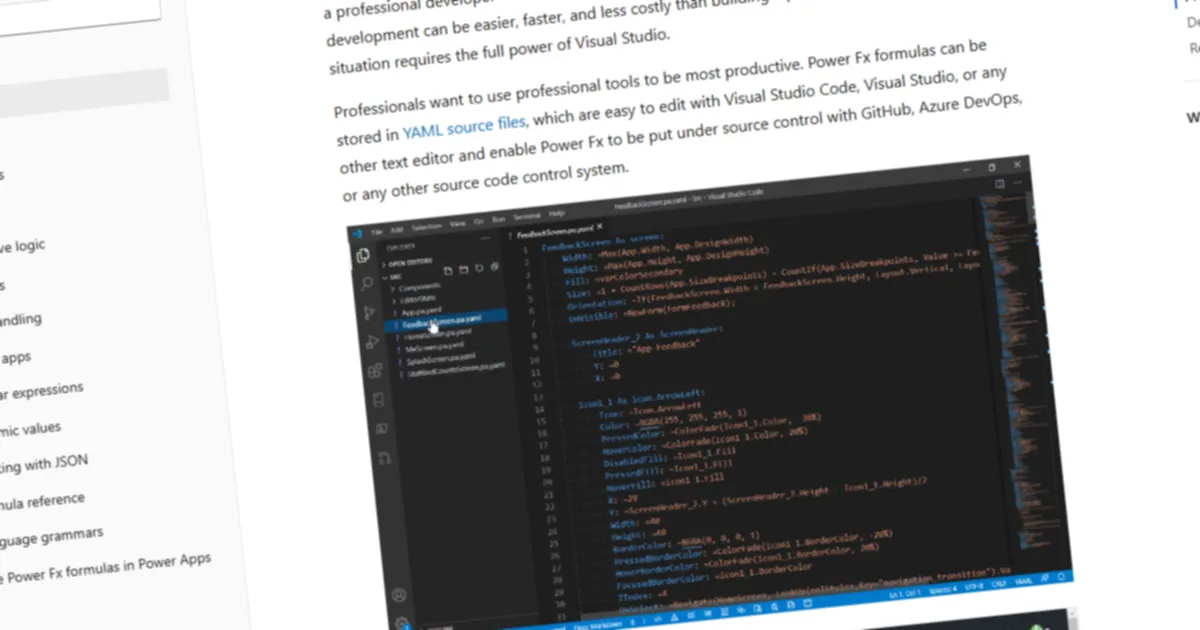
This one is close to my heart as a developer. You can now view the underlying code of your canvas apps in a human-readable YAML format, making it easier to understand functionality, manage source control, and follow solid ALM practices. No more Power Platform CLI just to extract source code! Whether you’re storing files in a repo, automating app generation, or refactoring outside the designer, this update streamlines the development process and brings native Git integration to Power Platform.
Endnotes
All in all another great set of improvements coming 🚀! And I am sure to keep an eye out for the next few months of changes. Luckily it is not all AI, we also get better usage reporting, easier Entra ID integration for Power Pages and improved pipelines
If you want you can read them all here.
Albert-Jan Schot
CTO, Microsoft MVP & FastTrack Recognized Solution Architect
I am Albert-Jan Schot, CTO at Blis Digital, Microsoft MVP, and FastTrack Recognized Solution Architect focused on Microsoft 365, Azure, and AI agents. I help teams turn complex Microsoft Cloud challenges into practical architecture decisions and shipped outcomes.
Zuid Holland, Netherlands